Four trades. One calculator app. Now it keeps the room.
FieldDojo is the free trade calculator app built for the back of the truck: concrete, BTU, wire size, fixture units, with the code reference printed next to every answer. Now you can sweep a room with your phone, pin the numbers where they apply, and send the client one link.


Walk the job.
Every room in 360°, notes pinned to the wall. A photo holds one wall and your notes hold the numbers, not where they go. Three days later someone asks which run got the 6 AWG, and you are driving back to look.
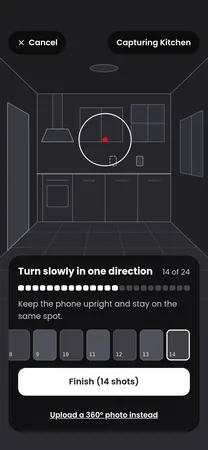
Capture
Sweep the room with the camera: about thirty seconds of turning on the spot, on the phone you already own. It stitches on the phone, with zero bars on site.
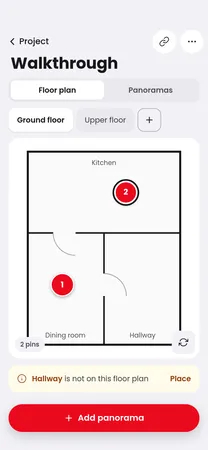
Pin
Add the floor plan (a photo of the prints is enough) and tap where you stood. Every room gets a number on the plan.

Return
Step back into the room from the office or the truck. Look around, and walk through a doorway into the next room.
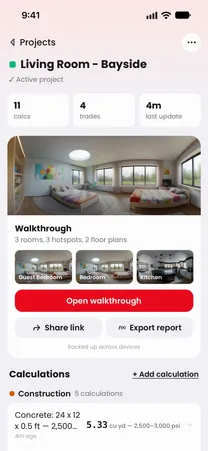
Share
Export the PDF report, or send one link: the client opens it in a browser and walks the job, with no app and no account.


Every number stays where it applies.
Tap a wall and leave something on it. The marker carries a number; the list says what it is. Nobody has to ask which outlet you meant.
- NoteRange hood ductA line of text, right on the thing it is about.
- Note and photoMove the outlet 18 in leftA close-up attached to the spot it was taken.
- CalculationTile: 86 tilesA saved result from your calculators, pinned where it applies.
- DoorwayOpens into Dining roomTap it to walk through to the next room.
Any phone. Nothing extra.
Walkthrough runs on iPhone and Android, from the newest Pro Max to the phone that has been on site for years. It captures with the camera and motion sensors every phone already has. If your phone can shoot a panorama, it can hold a room.
Trade math on scrap paper costs you money.
The notebook in your truck doesn't cite NEC. The calculator on your phone doesn't know what a board foot is. Spreadsheets don't open in a basement.
15.36 m³??
+ 10% waste = ~17?
order 18 yds
RECONVERT TO YD³
~20-21 yd³ order what?
60 ÷ ?? = ___
8 AWGundersized
10 AWG too small
need NEC chart
no signal · book in van
→ drive back ↩
One thumb. Right answer. Code attached.
65 calculators. Slab to breaker, duct to drain.
Tap a trade to see what's inside.
Pour the slab,
not the math.
Concrete, framing, drywall, roofing, stairs, decks, tile, pavers — 34 calculators, every formula a foreman reaches for on one screen.
- ✓Concrete volumeCubic yards or m³ for footings, slabs, walls, columns.
L × W × D - ✓Lumber & board feetBoard feet from dimensions. Stud count for any wall length and OC spacing.
- ✓Drywall, roofing, paintSheets needed, roofing squares, paint coverage by gallon — waste factor included.

Sized right.
First time.
BTU load, duct sizing, refrigerant charge, heat loss, SEER savings — eight calculators built for HVAC technicians. Numbers for the homeowner, not vibes.
- ✓BTU loadHeating & cooling load by climate zone, insulation, square footage.
- ✓Duct sizingRound & rectangular dimensions for target CFM and friction rate.
- ✓Refrigerant & ACHSubcooling and superheat calcs. Air changes per hour for any room.
ASHRAE 62.1

Amperage, with
the NEC table.
Wire size, voltage drop, conduit fill, panel load, motor FLA, transformer kVA — 14 calculators for electricians, every result tagged with its NEC article. Inspector ready.
- ✓Wire gauge & voltage dropSizing for any amperage and run length.
NEC 310.16 - ✓Conduit fillEMT size for any conductor count and insulation type.
NEC Chapter 9 - ✓Panel loadConnected and demand loads for a dwelling service.
NEC Article 220

Fixture units,
fixed.
Pipe sizing, flow rate, drain slope, gas pipe, septic, water heaters, fixture units — nine calculators for plumbers, no dog-eared table on the truck dash.
- ✓Pipe sizing & flowDiameter, flow, velocity for water supply, drainage, gas piping.
- ✓Fixture unitsWSFU and DFU per IPC and UPC.
UPC Table 6-3 - ✓Slope & water heaterDrain slope, fall-per-foot. WH sizing by occupancy.

Run the calcs on the spot.
Pick a job — see FieldDojo solve it with the formula and code reference attached.
Pick a job.
See the math.
This is the same calculator that ships on iOS and Android. Tap a scenario and watch the result animate in.
Designed for gloves, sun, and zero signal.
A jobsite calculator has to work where the job is. Every screen assumes you're wearing gloves, standing in the sun, and holding a phone with no bars.
Every result ships with the
code reference attached.
NEC 310.16 next to every wire size. ASHRAE 62.1 next to every ACH. Hand the inspector your phone, not a wink.
One tap. Inches to mm,
BTU to kW, gallons to litres.
Set it once in Settings. Every calculator, every result switches. No conversion factor on a Post-it.
No signal? No problem.
Every calc runs on-device. Basements, tunnels, rural service — everything works.
Big targets.
High contrast.
Buttons and inputs sized for a gloved thumb. Dark text on light cards that reads in the sun.
Share any result
as text or PDF.
Every calculation's history is one tap — send via Messages, email, or AirDrop. PDF export is free and carries the result's drawing; a free PDF ends with a small "Made with FieldDojo" mark. Pro adds a report style and editor, so the PDF is your own document.
Lists and a job timer,
on the project.
Every project keeps a materials list, a task list and a job timer. Run a fence, deck, drywall, tile, flooring or concrete calculation and add its materials to the list in one tap. With Pro, the lists and the clock sync across your devices.
See the result
before you cut.
Every result comes with a drawing, and 25 calculators build a 3D model of it. Turn it, zoom in, or open it full screen to check the stair, the slab or the deck against what is in front of you.
Your last result,
on the home screen.
The Last result widget shows your latest saved calculation on iPhone and Android, and on the iPhone lock screen. Quick calc puts your pinned calculators on the iPhone home screen, one tap from open.
Local by default.
No account required. No ads. Ever.
Calculations live on your phone. Use it anonymously, or sign in with Apple, Google or email when you want backup and sync; only then do they reach our servers.
Every result
lands in Recent.
Yesterday's slab is one tap away, inputs included. Pick up where you left off.
Know why.
Every calculator in the app has a method behind it. These walk through the code sections, the formulas, and the worked examples — free to read, no app required.
- Baluster Spacing: The 4-Inch Sphere Rule and the Math Behind ItBaluster Spacing: The 4-Inch Sphere Rule and the Math Behind Itconstruction
- How to Make a Cut List: Stock Count, Kerf and OffcutsHow to Make a Cut List: Stock Count, Kerf and Offcutsconstruction
- Jobsite Math: 14 Formulas Crews Use Every WeekJobsite Math: 14 Formulas Crews Use Every Weekconstruction
- Kerf Bending: How to Calculate Kerf Spacing for a CurveKerf Bending: How to Calculate Kerf Spacing for a Curveconstruction
- Miter Angles: Saw Settings for Any Corner or PolygonMiter Angles: Saw Settings for Any Corner or Polygonconstruction
- NEC 220.83: Load Calculation for an Existing Dwelling (the 8 kVA Rule)NEC 220.83: Load Calculation for an Existing Dwelling (the 8 kVA Rule)electrical
- What size breaker for this load?Breaker Sizing: NEC 240.6 Standard Ratings and the Next-Size-Up Ruleelectrical
- What size ground wire?Ground Wire Sizing: NEC Table 250.122 for Equipment Grounds and 250.66 for Electrode Conductorselectrical
- What rise and run for these stairs?How to Calculate Stair Rise and Run: Code Limits for the US, Canada, and the UKconstruction
- How big a service does this house need?Residential Electrical Load Calculation: NEC Article 220 Guideelectrical
- How many BTUs does this house need?Manual J Heat Load Calculation: HVAC Sizing Guide for TechniciansHVAC
- How many wires fit in this conduit?Conduit Fill Calculations: NEC Chapter 9 Guide for Electricianselectrical
- What size pipe for this fixture load?Pipe Sizing for Plumbers: Water Supply, Drainage, and Gas Pipingplumbing
- How much concrete do I need?How to Calculate Concrete for Footings, Slabs, and Columnsconstruction
- What size duct for this room?Duct Sizing for HVAC: The ASHRAE Equal Friction Method ExplainedHVAC
- What size wire do I need?Wire Sizing and Voltage Drop: What Every Electrician Needs to Knowelectrical
All 65 calculators stay free. Pro is live now.
Every calculator is free on iOS and Android, with no account and nothing to buy, and so is PDF export. Pro adds the jobsite walkthrough, the Pro report style and editor, unlimited projects, backup of every calculation, and sync. Try it free for 7 days on the Yearly plan.
- All 65 calculators, offline, no account needed
- Imperial and metric
- One project, with its materials list, tasks and job timer
- The last 30 calculations in history
- PDF export, with a small "Made with FieldDojo" mark
- Export a calculation as text or CSV
- A preview of each code reference page
- No ads
- Unlimited projects
- Jobsite walkthroughs: panoramas pinned to the floor plan
- Share a walkthrough by link; the client opens it in a browser, no app
- The Pro report style and editor: the PDF is your own document, without the FieldDojo mark
- Backup of every calculation, not only the last 30
- Sync across devices, with a project’s materials, tasks and time
- The full code reference
- Monthly$4.99/month · cancel any time$4.99
- YearlyFree trial7 days free, then $29.99/year · cancel any time$29.99
- LifetimeOne payment, yours for good$79.99
The 7-day free trial is on Pro Yearly, for new subscribers, one per Apple ID or Google account. It becomes the paid yearly plan unless cancelled before it ends; cancel any time in your App Store or Google Play subscription settings, and Apple or Google email you before the trial ends. Monthly and Lifetime have no trial.
Everything you'd ask a buddy.
Start the job.
No account for calcs. Works with zero bars. All 65 calculators, free on both stores.
Also on macOS, Windows and Linux.